.jpg)
The Future of 3D Printing: Our Top Picks for 2023 (Part 1)

Updated: Nov 21, 2023

Part 1 of 2 describes the best 3D Printers for 2023, describing the pros and cons of each one.
Navigating the multitude of 3D printers, spanning various price points and diverse technologies, can pose a challenge in selecting the optimal one for your requirements. In our commitment to assist you, we consistently refresh our comprehensive 3D printer guide with the most recent reviews. We've categorized our recommended selections to streamline your decision-making process, ensuring you can identify the best 3D printer tailored to your needs.
What Makes A Good 3D Printer?
Looking at subsequent benchmarks to determine the choices provided by various sources.
1) Print quality: scrutinizing resolutions, precision, and uniformity in output.
2) Build Space: while printing miniatures may not pose a challenge, a larger build volume can benefit broader applications.
3) Dependability: of particular significance in cost-effective printers, opting for robust models renowned for their dependable performance.
4) Adaptability: assessing the spectrum of printable materials and additional features like dual extruders, enclosures, and more.
5) Ease of use: considering factors such as uncomplicated assembly, straightforward setup procedures, and user-friendly slicer software.
The Best 3D Printers for Each Category
Article Post Part 1 (11/15/2023)
Best Printers Under $315.00 For Fused Deposition Modeling (FDM):
Creality Ender 3 V3 SE

2. Anycubic Kobra 2 Pro

Best under $315.00 for Resin:
Anycubic Photon Mono 4K

2.Elegoo Mars 3 Pro 4K / Mars 4 Max 6K


Best For Kids (Beginners as just a Hobby)
Toybox 3D Printer

Article Post Part 2 (11/22/2023)
Best For $500.00 for Fused Deposition Modeling (FDM):
Anycubic Vyper

2. Prusa Mini

3. Creality Ender 3 S1 Pro
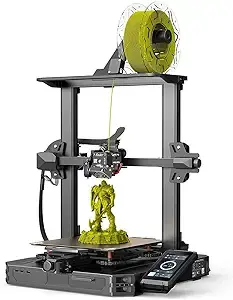
Best For Large - Format Resin Printer:
1) Anycubic Mono X2

2) Elegoo Saturn S

Best Under $300.00 for Fused Deposition Modeling (FDM):
Creality Ender 3 V3
Quick Facts
Build Volume: 220 x 220 x 250 mm
Print Speed: 180 mm/s
Printing Accuracy: +/- 0.1mm
File Transfer: S Card, USB-C Port
Recommended Filament: PLA, PETG, TPU (95A)
Description
The Creality Ender 3 V3 SE continues the impressive legacy of the Ender 3 series, taking it a step further with an attractive price tag of $219, now accessible on Amazon and Creality’s website. Whether you're a newcomer venturing into 3D printing or an experienced enthusiast revisiting the classics, the Ender 3 V3 SE caters to a diverse audience.
Print Speed: Boasting a remarkable maximum print speed of 250 mm/sec, the Ender 3 V3 SE outpaces its predecessors in the Ender 3 series, providing a significant speed advantage for turning creative ideas into tangible objects swiftly.
Automatic Bed Leveling: The Ender 3 V3 SE features the CR Touch, akin to the K1, ensuring precise automatic bed leveling. This eliminates the need for manual adjustments during the printing process, streamlining the user experience for enhanced print quality.
Visual User Interface: The Ender-3 V3 SE enhances the user interface, dynamically displaying auto bed leveling progress and printing parameters. This feature allows users to manage filaments and monitor the printer's status while multitasking.
Reliable Sprite Direct Extruder: Equipped with the Sprite Direct Extruder, the Ender 3 V3 SE accommodates various filaments such as PLA, PETG, and flexible TPU, providing flexibility in printing different 3D models without limitations.
Quick Assembly and Easy Printing: The Ender 3 V3 SE sets itself apart with a 20-minute assembly time right out of the box. Designed for both novices and experts, this printer facilitates an easy entry into the captivating realm of 3D printing, making it an ideal choice for beginners and seasoned enthusiasts alike.
Pros
- Remarkably budget-friendly
- Automated Bed Leveling
- Increased Printing Speed
- User-friendly UI Display
- Efficient "Sprite" Direct Extruder
- Streamlined and Stylish Design
Cons
- Ender 3 SE features more plastic components compared to typical Creality printers.
- Plastic is utilized in the base enclosure, top crossbeam, and many side pieces of the gantry.
- Metal is strategically employed in crucial areas like the side beams and gantry beam for enhanced durability.
Links for Purchase
- Price $215.00 - $290.00 (Sale) as of (11/15/23)
-Price: $219.99 as of (11/15/2023)
2. Anycubic Kobra 2 Pro

Quick Facts
Build Volume: 250 x 220 x 220 mm
Print Accuracy: +/- 0.1 mm
Print Speed: 300mm/s
Max Print Speed: 500 mm/s
File Transfer: USB Port x 3
Recommended Filament: PLA, ABS, PETG, TPU
Description
The Anycubic Kobra 2 is currently a strong contender in the 3D printer market, offering a budget-friendly option with a compact design and convenient out-of-the-box functionality. While similar printers may flood the market in the future, the Kobra 2 stands out as a reliable choice at present, especially for those new to FDM 3D printing.
Despite initial skepticism about the lack of manual bed adjustment, the Kobra 2 proves to be effective and is recommended for beginners. Its easy setup allows users to plug it in, let the machine calibrate itself, and start printing, particularly for PLA at 0.2mm layer height with stock settings. However, customization beyond these parameters may require independent exploration or seeking guidance online.
The printer's speed and hardware upgrades contribute to efficient performance without significantly sacrificing quality. While adjusting the print speed can enhance quality, the improvement may be marginal depending on the intended use.
The bed texture surpasses expectations, eliminating the need for immediate upgrades common in other affordable FDM printers. However, the noise level remains a drawback, and users may need to tolerate the high-speed noise until future advancements address this issue.
For larger prints, the Kobra 2 has limitations due to its smaller build plate, requiring users to divide terrain into sections, which may be inconvenient for some. Nevertheless, for those content with the available size, the printer performs well straight out of the box.
Despite some challenges with fine-tuning for smaller layers, the Kobra 2 offers an enjoyable overall experience. While adjustments may be necessary for specific tasks, the printer receives a recommendation for its excellent "out of the box" performance, particularly for beginners aiming to print 0.2mm layer height at high speed. While suitable for everyday use, the touchscreen interface may pose challenges for precise adjustments.
In conclusion, the Anycubic Kobra 2 earns praise for delivering a user-friendly experience, making it a commendable choice for those seeking reliable performance without excessive complexity.
PROS
-One of the most affordable 3D printers available, featuring auto-leveling.
-The direct drive extruder is well-suited for beginners and excels in printing flexible materials.
-Exceptional performance considering the price.
CONS
- A slightly larger build volume would be preferable.
- Smaller maximum height compared to alternatives like the Ender 3 S1.
Links for Purchase
Best under $300.00 for Resin
1. Anycubic Photon Mono 4k
Quick Facts
Build Volume: 132 x 80 x 165 mm
Print Resolution: 3840 x 2400 pixels
Print Speed: 50 mm/h
File Transfer: SD Cards (PWO File Format)
Recommended Filament: Resin
Description
The Anycubic Photon Mono 4K marks a significant enhancement from the standard Photon Mono. It maintains the original's simplicity while elevating the XY resolution from 50 to 35 microns, aligning it with the pricier Mars Elegoo 3.
This notable transformation is attributed to the adoption a 6.23″ LCD boasting 3,840 x 2,400 pixels. Although the 165 x 132 x 80 mm dimension falls slightly behind the Mars 3's 143 x 90 x 165 mm, it still provides substantial space for various resin-based home projects.
While the cure time of 1-2 seconds remains consistent with the original Mono, the Mono 4K enables the production of equivalent prints within the same timeframe, achieving a higher overall quality. The 4K model also incorporates a new 15-LED matrix parallel light source, ensuring more uniform light distribution and enhanced detailing.
Choosing between the Anycubic Photon Mono 4K and the Elegoo Mars 3 involves a trade-off. While the Mars 3 offers a sleeker overall printing experience, the Anycubic Photon Mono 4K competently matches in specifications and print quality, all at a more budget-friendly price, at $80 less.
For those seeking an optimal balance between cost-effectiveness and a reliable, high-quality resin 3D printer, the Anycubic Photon Mono 4K emerges as a compelling choice.
PROS
-Highly reliable with consistently excellent results
-Beginner-friendly
-Easy to grasp
CONS
Occasionally messy and necessitates regular cleaning.
Links for Purchase
-Price: $169.99 as of (11/15/2023)
-Price: $152.99 - $249.99 as of (11/15/2023)
2. Elegoo Mars 3 Pro 4K / Mars 4 Max 6K
Quicks Facts
Elegoo Mars 3 Pro 4K
Print Volume: 143 x 90 x 175 mm
Screen Resolution: 6.6″ 4K LCD
XY Resolution: 35 microns (um)
Speed: 1.5-3 seconds per layer
Cleaning/Curing: Elegoo Mercury Plus/X
Elegoo Mars 4 Max 6K
Print Volume: 195.84 x 122.4 x 150 mm
Screen Resolution: 5760 X 3600 LCD
XY Resolution: 34 microns (um)
Print Speed: 70 mm/H
Cleaning/Curing: Elegoo Mercury Plus/X
Description
Elegoo Mars 3 Pro 4K
The Elegoo Mars 3 Pro, a compact resin 3D printer from the reputable Elegoo brand, builds upon the success of its predecessors, the Elegoo Mars 1 and Mars 2. Elegoo has established itself as a prominent player in the resin 3D printing arena, with the Mars 2 Pro and Mars 3 earning recognition as recommended printers for beginners, especially for tasks requiring intricate details such as miniature printing.
Featuring a 6.6-inch screen and a 143 x 90 x 175 mm build plate, the XY resolution of this printer is 35 microns (μm) per pixel. The Pixel Per Inch (PPI) stands at approximately 732, a commendable figure compared to other printers within its price range. While not as large as printers like the Saturn 2 or Photon Mono X, it strikes a balance, avoiding the limitations of being overly compact.
The Mars 3 series arrives fully assembled, requiring only the removal of the protective film and inserting the printing plate into the machine. This "fully built" approach aligns with the standard practice in resin printers, a departure from the kit-based assembly often associated with FDM printers. With the Mars 3, you can commence printing within a matter of minutes, a stark contrast to the assembly required by many FDM printer kits.
While some argue that the pro features of the Elegoo Mars 3, such as screen protectors and standalone active carbon filters, are somewhat overrated, the printer's specifications and price present a compelling case. The Elegoo Mars 3's performance and affordability have earned it a prominent place at the pinnacle of our article discussing the Best 3D Printer for Miniatures.
Elegoo Mars 4 Max 6K
The ELEGOO Mars 4 Max boasts a 9.1-inch 6K monochrome LCD screen with an impressive 5760x3600 resolution and a 34um XY resolution, ensuring highly detailed prints. The tempered glass with a hardness rating of 9H adds durability and protection against scratches.
Beyond resolution, the COB+ refractive light source enhances performance by delivering a vertical and uniform 405nm wavelength beam across the LCD screen. Paired with a grayscale anti-aliasing algorithm, this technology produces 3D-printed models with fine details, a realistic aesthetic, and a smoother surface.
With a generous build volume of 195.84x122.4x150mm (7.71x4.81x5.9 inches), the Mars 4 Max offers creative flexibility, accommodating large models or simultaneous printing of multiple parts. The printer's efficient double-fan cooling system ensures heat management, preserves print quality, and extends the printer's lifespan.
Utilizing the Voxeldance Tango software, the Mars 4 Max features three printing modes: static, dynamic smooth, and dynamic high-speed. The adaptable print lifting speed in active mode optimizes efficiency based on the model's cross-section, providing flexibility without compromising quality. Compatibility with ELEGOO's open-source GOO slicing format further expands software options.
In conclusion, the ELEGOO Mars 4 Max MSLA 3D Printer stands out with its high resolution, innovative light source, ample build volume, efficient cooling, and versatile software. Whether you're a novice or an experienced 3D printing enthusiast, ELEGOO's commitment to cutting-edge technology and user-friendly experiences is evident in the Mars 4 Max.
PROS
- Competitive Pricing:
- The Mars series offers a highly competitive price point within its product line and across other manufacturers.
- Positioned as the best small 4k printer available while remaining one of the most budget-friendly options.
- Quality Components:
- The screen, build plate, screws, and casing exhibit top-notch quality.
- Anticipation of repairs or replacements is minimal, ensuring a durable and reliable printing experience for the foreseeable future.
- User-Friendly Experience:
- Standard slicer and default settings facilitate immediate printing of detailed miniatures.
- While customization is an option, it is not strictly necessary, making it accessible to users of all levels of expertise.
CONS
- One of the biggest disadvantages of resin 3D-printing is the post-processing. Supports need to be removed and parts need to be washed and cured to achieved proper end properties.
- Doesn't always work well for large projects, appropriate materials aren't always available and it has regulatory challenges.
Links for Purchase
Elegoo Mars 3 Pro 4K
-Price: $159.99 -$350.00 as of (11/15/2023)
-Price $198.99 - $297.99 as of (11/15/2023)
Elegoo Mars 4 Max 6K
-Price: $249.99 as of (11/15/2023)
-Price $284.99 - $356.99 as of (11/15/2023)
Best for Kids (Beginners as just a hobby)
1. ToyBox 3D Printer
Quick Facts
Build Volume: 70 x 80 x 90 mm
Print Accuracy: +/- 0.02 mm
Print Speed: 20 - 60 mm/s
File Transfer: USB Port x 3 STL File
Recommended Filament: PLA
Description
While not positioned as a sophisticated industrial 3D printer for entrepreneurial endeavors, the Toybox distinguishes itself as one of the most user-friendly models. Recommending it for those searching for a 3D printer catering to kids or beginners seeking a hassle-free introduction to the technology.
Featuring a modest build volume measuring 70 x 80 x 90 mm, the Toybox is an excellent choice for those whose printing needs center around miniatures and whimsical characters. Teaming with renowned partners, Toybox grants access to various free 3D models, ranging from iconic superheroes like Batman and Wonder Woman to imaginative options such as dragons, tanks, and cars.
The first print using the Toybox was a charming seal sourced from their repository, capturing a delightful experience. Prioritizing safety for children, the Toybox relies on low-temperature PLA for printing and encloses any hot components strategically, ensuring they remain out of reach.
While excelling in printing with small spools of various color filaments playfully dubbed "3D printer food," it's essential to note the limitation to low-temperature materials like PLA. However, the convenience of setting up and changing filaments is designed to be straightforward, allowing children to experiment with different colors easily.
The Toybox is highly recommended for beginners seeking a stress-free and enjoyable experience or parents aiming to introduce their kids to 3D printing affordably. To delve deeper into its capabilities, you can explore my comprehensive review of the Toybox 3D printer and our roundup of the best 3D printers tailored for beginners.
PROS
Undoubtedly one of the most user-friendly 3D printers worldwide, this device is exceptionally well-suited for absolute beginners and children. The setup is fast and straightforward, providing users access to an extensive collection of complimentary toy files, including licensed prints such as Batman.
CONS
The printing area of this printer is restricted compared to others on the list, measuring just 70 x 80 x 90 mm. It exclusively supports PLA and low-temperature printing, prioritizing safety for children but limiting the range of available printing materials.
Links for Purchase
-Price: $349.99 - $439.99 as of (11/15/2023)
-Price: $349.99 as of (11/15/2023)
Interested in learning more about what 3D Printing has to offer? These products are FREE to help you start your 3D printing journey.
🚀 Elevate your knowledge and stay ahead of the curve! 🌐 Click the button below to join our exclusive weekly newsletter.
🔍 Wednesdays: Dive into the cutting-edge world of 3D printing, unlocking secrets and insights that will redefine your approach.
⚙️ Fridays: Supercharge your productivity with expert tips and strategies for enhanced human performance, setting the stage for a weekend of accomplishment.
Don't miss the latest trends, tips, and transformative ideas! 📈 Click now to subscribe and empower your journey.
Source Information
Ender-3 V3 SE 3D Printer Combo -Creality
Ender-3 V3 SE 3D Printer - Amazon
Anycubic Kobra 2 Pro - Anycubic
Anycubic Kobra 2 Pro - Amazon
Anycubic Photon Mono 4k - AnyCubic
Anycubic Photon Mono 4k - Amazon
Elegoo Mars 3 Pro 4K - Elegoo
Elegoo Mars 3 Pro 4K - Amazon
Elegoo Mars 4 Max 6K - Elegoo
Elegoo Mars 4 Max 6K - Amazon
ToyBox 3D Printer - Toybox
ToyBox 3D Printer - Amazon
Keywords: Future 3D Printing Top Picks 2023


Predictions about the future of 3D printing are always fascinating because they show how fast this field is evolving. What was once limited to prototypes is now shaping industries from medicine to architecture. Alongside industrial innovation, there’s also a growing space for entertainment and hobbyists. Sites like https://www.gambody.com/premium/star-wars-rogue-one-droid-k-2so highlight this perfectly by giving fans access to premium STL files of beloved game and comic characters. It shows that the future isn’t only about large-scale factories—it’s also about empowering individuals to bring their favorite universes to life at home. This duality is what makes the technology so powerful.