.jpg)
The Future of 3D Printing: Our Top Picks for 2023 (Part 2)


Part 2 of 2 describes the best 3D Printers for 2023, describing the pros and cons of each one.
Navigating the multitude of 3D printers, spanning various price points and diverse technologies, can pose a challenge in selecting the optimal one for your requirements. In our commitment to assist you, we consistently refresh our comprehensive 3D printer guide with the most recent reviews. We've categorized our recommended selections to streamline your decision-making process, ensuring you can identify the best 3D printer tailored to your needs.
What Makes A Good 3D Printer?
Looking at subsequent benchmarks to determine the choices provided by various sources.
1) Print quality: scrutinizing resolutions, precision, and uniformity in output.
2) Build Space: while printing miniatures may not pose a challenge, a larger build volume can benefit broader applications.
3) Dependability: of particular significance in cost-effective printers, opting for robust models renowned for their dependable performance.
4) Adaptability: assessing the spectrum of printable materials and additional features like dual extruders, enclosures, and more.
5) Ease of use: considering factors such as uncomplicated assembly, straightforward setup procedures, and user-friendly slicer software.
The Best 3D Printers for Each Category
Article Post Part 1 (11/15/2023)
Best Printers Under $315.00 For Fused Deposition Modeling (FDM):
Creality Ender 3 V3 SE

2. Anycubic Kobra 2 Pro

Best under $315.00 for Resin:
Anycubic Photon Mono 4K

2. Elegoo Mars 3 Pro 4K / Mars 4 Max 6K


Best For Kids (Beginners as just a Hobby)
ToyBox 3D Printer

Article Post Part 2 (11/22/2023)
Best For $500.00 for Fused Deposition Modeling (FDM):
1) Anycubic Vyper

2) Prusa Mini

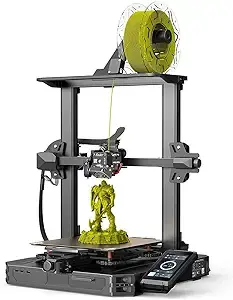
3) Creality Ender 3 S1 Pro
Best For Large - Format Resin Printer:
1) Anycubic Mono X2

2) Elegoo Saturn S
If you would like to view the first article that contains all the pros and cons, quick facts, and descriptions of the best printers under $315.00, then click on the link here - The Future of 3D Printing: Our Top Picks for 2023 (Part 1)
Best For $500.00 For Fused Deposition Modeling (FDM)
Anycubic Vyper
Quick Facts
Build Volume: 245 x 245 x 260 mm
Print Speed: 180 mm/s
Printing Accuracy: +/- 0.1mm
File Transfer: USB, Trans -flashcards
Recommended Filament: PLA, ABS, PETG, TPU, WOOD
Description
The Anycubic Vyper comes with impressive capabilities. The printer boasts a particular build volume that surpasses expectations for its price range. Despite this, it maintains a compact design suitable for most desktop spaces.
One notable feature is the user-friendly auto-leveling function, simplifying the calibration process with a single click. Additionally, the Vyper automatically adjusts the nozzle height to ensure optimal printing conditions. Including a spring steel magnetic platform further enhances the user experience by facilitating easy print removal. Its magnetic properties allow users to detach the entire plate, conveniently retrieve their model, and seamlessly reposition it for the next print.
During the testing, adherence to the standard 50-60mm/s printing speed. However, Anycubic emphasizes Vyper's innovative double fan system, enabling printing speeds of up to 100mm/s without compromising quality. It's worth noting that caution is advised when opting for higher speeds, especially when working with intricate or minimalistic models.
The printer features a generous 4.3-inch touchscreen that streamlines the printing process. The interface is not only intuitive but also straightforward to navigate. While lacking WiFi connectivity, transferring models from Cura to the SD card is a hassle-free alternative for seamless printing on the Vyper.
In summary, the Anycubic Vyper is an excellent choice for 3D printing enthusiasts, offering a balance of performance and convenience. Our comprehensive review delves deeper into its features and performance, providing further insights for those considering this compact 3D printer for their creative endeavors.
Pros
Conveniently detachable metal printing surface
Outstanding automated bed leveling
Robust dual-gear filament feeding mechanism
Hot end designed in the style of a volcano, compatible with E3D nozzles
Cons
Overlooked potential by lacking a broad-bore nozzle for the Volcano hot end
Bed coating lacks durability
The coarse texture on the bed obscures the details of the first layer
Links for Purchase
-Price $219.00 - $359.00 (Sale) As of 11/22/2023)
2. Prusa Mini
Quick Facts
Build Volume: 180 x 180 x 180 mm
Bed Leveling: Yes, SuperPINDA probe
Build Platform: Removable magnetic spring steel sheets
Filament Compatibility: PLA, PETG, ASA, ABS, Flex
Connectivity: USB, Ethernet
Description
The Prusa Mini ingeniously consolidates the user-friendly features and specifications of the Prusa i3 MK3S+ into an impressively affordable printer. Positioned at an entry-level price point, the Prusa Mini stands just marginally higher than the famous Ender 3 and Anycubic Kobra.
This sophisticated 3D printer prioritizes simplicity, boasting automatic mesh bed leveling facilitated by the exceptional SuperPINDA probe, an elegant PEI-coated spring steel removable bed, and remarkably clear and user-friendly instructions.
Distinguishing itself from typical budget printers, the Prusa Mini exhibits versatility by accommodating a broader range of materials, including PLA, ABS, PETG, ASA, and HIPS, and even delivering commendable results with challenging exotics like PC blends and CF-PETG.
Despite its impressive attributes, it's evident that Prusa made some compromises, notably with the relatively modest 180 x 180 x 180 build volume. This volume should suffice for most common print projects for the average maker, especially beginners. However, individuals seeking to print large models or expansive terrain areas for miniatures may find the Ender 5 Plus more suitable.
Beyond its volume limitation, the Prusa Mini stands out as a robust premium-budget option, catering to those purchasing their first printer and seasoned makers looking to expand their printer lineup.
Pros
Great price for the user experience and finish
Exceptional print quality
A great UI without a touchscreen function
Cons
Recurring Bowden system issues
Missing a built-in handle
Absence of a Wi-Fi upgrade—where is it?
Links for Purchase
-Price $459.00 As of (11/22/2023)
3. Creality Ender 3 S1 Pro
Quick Facts
Build Volume: 220 x 220 x 270 mm
Print Speed: 150 mm/s
Printing Accuracy: +/- 0.1mm
File Transfer: USB Type -C / SD Card
Recommended Filament: PLA, ABS, PETG, TPU, WOOD
Description
Recommending the standard Ender 3 or Ender 3 V2 as budget-friendly FDM kits is accurate. However, for those seeking advanced features with a slightly higher investment, the Ender 3 S1 Pro is one of the top printers under $500.
The assessment during the Ender 3 S1 3D printer review impressed many with its print quality. Despite a similar build volume to the standard Ender 3 (270 mm compared to 250 mm on z-height), the S1 Pro distinguishes itself with an all-metal and direct drive extruder, a departure from the Ender 3's PTFE Bowden extruder. This upgrade simplifies printing flexible materials like TPU and mitigates filament jamming due to the enhanced extruder quality.
Remarkably, the S1 Pro accommodates temperatures up to 300°C, allowing for the seamless use of high-temperature Nylon and other filaments—an uncommon feature in printers below the $500 mark. In contrast, the Ender 3 standard supports temperatures up to 255°C, while the Ender 3 S1 (non-Pro) handles up to 260°C.
Another notable feature is the auto-bed leveling, a convenience often requiring separate purchases such as CRTouch or BLTouch for the Ender 3. Including this feature in the Ender 3 S1 and S1 Pro is a significant advantage, eliminating the hassle and time investment associated with manual leveling. The z-axis of the S1 Pro is also notably sturdier and of higher quality, contributing to more reliable and precise printing. For those focusing on fine details, the Ender 3 S1 series offers an impressive range, with the ability to achieve 0.05mm layer heights compared to the 0.1mm on other Ender 3 models.
Pros
Demonstrated exceptional performance in our hands-on evaluation.
Assembly and initiation of printing are swift and uncomplicated.
The direct drive proves more user-friendly compared to the original Ender 3.
The elevated 300°C nozzle temperature expands filament printing possibilities beyond the limitations of the standard S1, which is capped at 260°C.
Cons
Higher price than previous Ender 3 3D printers
Links for Purchase
-Price $307.00 - $439.00 (Sale) As of (11/22/2023)
-Price $348.00 - $395.00 (Sale) As of (11/22/2023)
Best for Large - Format Resin
1) Anycubic Mono X2
Quick Facts
Connectivity: USB 2.0
Printing technology: LCD
Light source: Anycubic Lighturbo (27,320 lux)
Resolution: 4096x2560
XY resolution: 48um (0.048mm)
Z-axis resolution: 10um (0.01mm)
Build platform: Laser-engraved aluminum alloy
Build volume: 7.8 x 7.7 x 5-inches. / 200 x 196 x 122 mm
Description
The Anycubic Photon Mono X2 is the successor to the original Mono X, launched in 2020. Notable enhancements include a slight expansion in build space and resolution, with the company asserting improved illumination for higher-quality prints. However, it's not all positive news, as WLAN functionality has been omitted from the Mono X2.
Setting up the Mono X2 is remarkably straightforward, requiring less than 20 minutes from initiation to completion. The clear instructions in the manual ensure that even beginners encounter minimal difficulties during installation.
In terms of aesthetics, the Photon Mono X2 has undergone a noticeable transformation compared to its forerunner, featuring an updated angled look and a departure from the iconic yellow-tinted cover. Functionally, however, the device remains consistent, with familiar features such as the resin tank and construction plate secured by screws. The placement of the display and various connections mirrors that of the Mono X, adhering to the principle of not fixing what isn't broken.
Equipped with a 9.1" monochrome 4K+ (4096x2560px) LCD screen, the Photon Mono X2 addresses previous LED spacing issues that created uneven light patterns. The alteration in the distance between the light source and the lens eradicates this problem and eliminates prior anti-aliasing issues.
The build plate, measuring 7.8 x 7.7 x 5 inches (200 x 196 x 122 mm), proves sufficient for hobbyist users, accommodating various models and even larger prints with strategic positioning. The construction quality is exemplary, featuring a plastic transparent cover and metal base casing that collectively contribute to a premium device feel.
Pros
Simple Setup
Accurate, detailed, and reliable print quality
Large build volume in a compact design
Great value for money
Cons
There is no WLAN connection
Links for Purchase
-Price $249.00 - $529.99 (Sale) As of (11/22/2023)
-Price $249.99 As of (11/22/2023)
2. Elegoo Saturn S
Quick Facts
Build Volume: 196 x 122 x 210 mm
Bed Leveling: Manual
Printing Speed: 30 - 70 mm/h
LCD: 9.1-inch 4K HD Monochrome
XY Resolution: 48 microns
Z-Axis Resolution: 0.00125mm (1.25 um)
Filament Compatibility: Resin
Connectivity: USB
Description
The Elegoo Saturn S represents a refreshed iteration of the standard Saturn, aligning itself with more expansive resin competitors like the Anycubic Mono X series.
Compared to the conventional Saturn, the Saturn S boasts an increased build volume, expanding from 192 x 120 x 200 mm to 196 x 122 x 210 mm. While this increment may seem modest, these dimensions position the Saturn S as one of the larger-format printers available for under $500, making it an ideal choice for efficiently producing batches of intricately detailed figurines.
Furthermore, the Saturn S introduces a 4K screen, refining the XY resolution to 48 microns—slightly surpassing the Saturn's 50 microns. While one could invest an additional $200 in the Photon Mono X 6K to achieve a lower 34-micron resolution, the distinctions at this scale may be invisible to all but the most discerning makers.
Comparing it with the Anycubic Mono X (excluding the 6K version), both printers feature similar 4K screens and resolutions. However, the Saturn S has a 4mm larger X-axis, while the Mono X boasts a 35mm larger Z-height. The Mono X is the preferable choice for those aiming to print taller models.
Similarities in speed and USB connectivity decide between the Saturn S and Mono X dependent on specific printing preferences: prioritize the Saturn S for more comprehensive prints or opt for the Mono X for taller ones. If a 6K screen is paramount, the Mono X 6K becomes the preferred option.
Pros
A top-tier, affordable large-scale resin 3D printer.
Outstanding precision and speed achieved through 2-3/layer exposures, making it perfect for efficiently producing batches of miniatures or sizable prototypes.
Dependable and resilient printing device.
Cons
Newer Saturn S or Saturn 8K are better quality (but more expensive).
Links for Purchase
-Price: $199.99 - $500.00 (Sale) As of (11/22/2023)
-Price: $299.99 - $474.99 (Sale) As of (11/22/2023)
Interested in learning more about what 3D Printing has to offer? Download our Free products to help you start your 3D printing journey.
🚀 Elevate your knowledge and stay ahead of the curve! 🌐 Click the button below to join our exclusive weekly newsletter.
🔍 Wednesdays: Dive into the cutting-edge world of 3D printing, unlocking secrets and insights that will redefine your approach.
⚙️ Fridays: Supercharge your productivity with expert tips and strategies for enhanced human performance, setting the stage for a weekend of accomplishment.
Don't miss the latest trends, tips, and transformative ideas! 📈 Click now to subscribe and empower your journey.
Anycubic Vyper - Anycubic
Prusa Mini -Prusa
Creality Ender 3 S1 Pro - Creality
Creality Ender 3 S1 Pro - Amazon
Anycubic Mono X2 -Anycubic
Anycubic Mono X2 - Amazon
Elegoo Saturn S - Elegoo
Elegoo Saturn S - Amazon


Comments